Weapon detection
Flag a potential visible weapon and bring available camera and location context to authorized reviewers.
THE WIRED4SAFETY PLATFORM
Connect legacy panels, personal alerts, and site context with the people responsible for the next step.
Safety data, enhanced with AI
We enhance safety data with AI to help people understand what needs attention. Supported video analytics can flag potential weapons, fire, smoke, and fights, giving your team visual context to review and a clearer starting point for response.
Flag a potential visible weapon and bring available camera and location context to authorized reviewers.
Surface visual signs of flame so your team can assess the scene alongside connected alarm events.
Highlight possible smoke in supported camera views and route the event into the agreed review workflow.
Flag patterns that may indicate a physical altercation, helping people assess the situation and coordinate assistance.
AI camera integrations
Bring Omnilert, Actuate, and CyberLink FaceMe into your safety plan. Match each integration to the cameras, events, and response workflow your site needs.
Visible firearm detection
Gun Detect analyzes supported camera feeds for visible firearms and brings potential detections to people for verification and response.
Explore OmnilertGun & intrusion analytics
Add gun and intruder detection to supported video systems, with event footage that helps your team review what triggered an alert.
Explore ActuateIdentity & access
Facial recognition for configured identity, visitor, and access workflows, with connections to supported video management systems.
Explore FaceMeAvailable features depend on the selected vendor, licensing, camera views, and site configuration. FaceMe identity workflows are configured with your organization’s enrollment, access, and retention policies.
AI enhances the data. People assess the context and direct the response.
Plan your camera integrationsDetection options depend on the selected analytics, camera views, integration, and site validation. False alerts and missed events are possible. Video analytics complement existing safety systems; they do not replace required fire detection or emergency procedures.
THE WIRED4SAFETY PLATFORM
An alert is only the beginning. Connect the person, the place, and the people responding — from the first activation to the incident review.
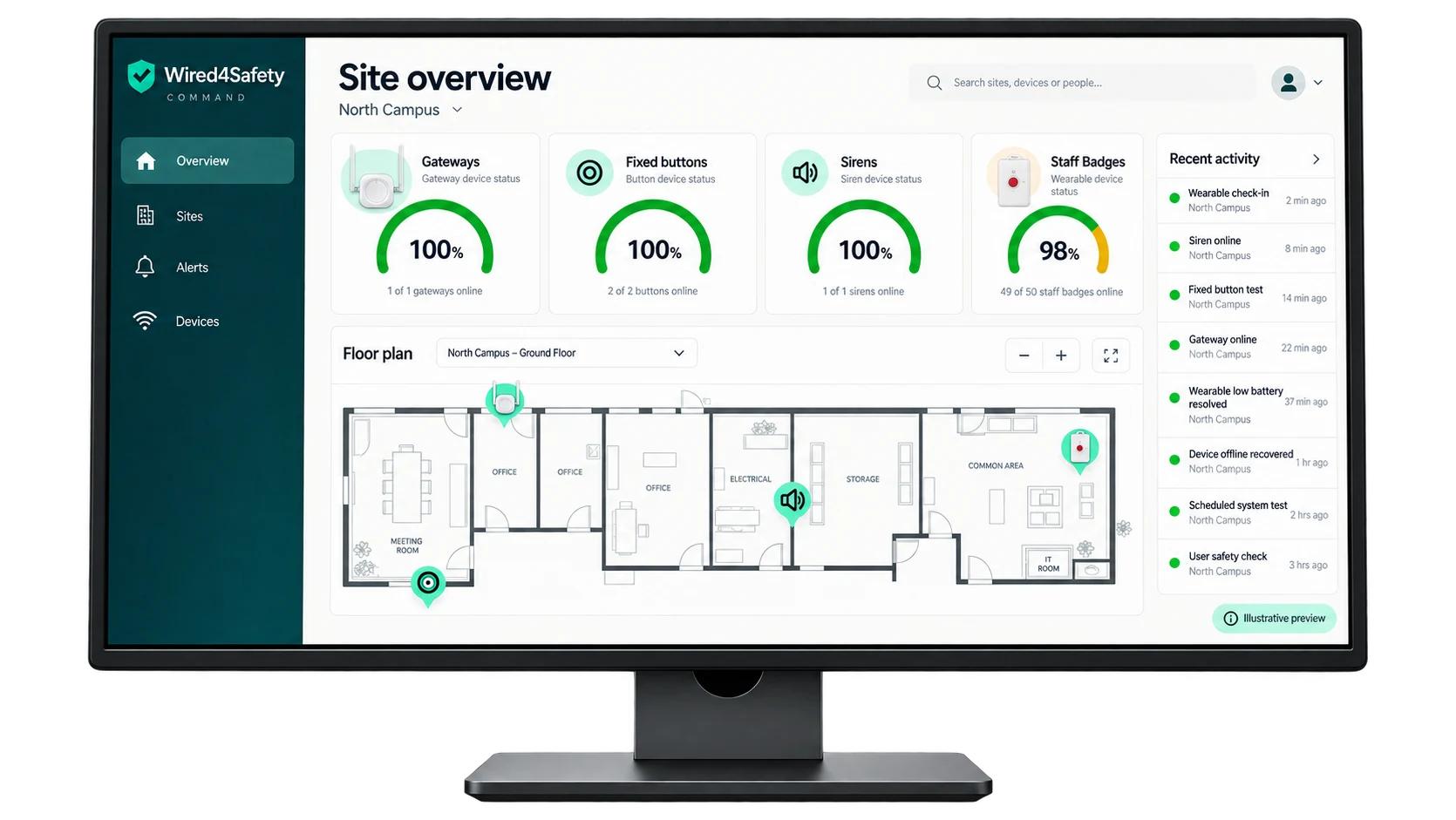
Command brings device health, facility maps, incoming alerts, operator acknowledgement, and activity history into one workspace.
Bring event details, available location, and device information into the same view.
Give authorized teams a shared place to review alerts and follow response activity.
Keep acknowledgement, incident history, and audit records connected.
Command & Locate
Connect the alert, the available camera view, and the facility map. Give authorized teams the context to assess the situation and coordinate assistance.
Bring relevant views from supported cameras into the alert workflow. Operators can review the scene alongside event details and available location, with viewing access defined for their role.
Navigate buildings, floors, rooms, and zones. Place alerts on a shared facility map with named access points and site information that helps response teams orient themselves.
Identify AEDs, first-aid supplies, and other safety resources alongside incident location. Keep asset positions and floor plans current as the facility changes.
FROM A SIGNAL TO A SHARED RESPONSE
Walk through an example. See how each step adds the information a response team needs.
01 / ACTIVATION
A wearable, fixed button, or mobile app creates an event with the available person and device context. Test and maintenance events remain distinct from operational alerts.
LET’S CONNECT THE NEXT STEP
Map your equipment, your people, and the response you want to support.